Tonight's show will go sideways. Your packing won't.
Ship Show is a label printing app for Whatnot live shows. It prints a tag the second a buyer wins and tells you which box it goes in. Press GO, sell like nobody's watching (everybody's watching), and when the show ends the packing is already sorted.
The practice show runs the real app's screens in your browser with pretend buyers. Nothing leaves your device. Or press GO on the toy demo right below.
On this page Toy demo Win. Tag. Box. What goes wrong Look around The toolbox Platforms Early access Pricing
Five things that set it apart
Whatnot's official connection
On Whatnot it reads your orders through Whatnot's official Seller API, with a token you paste yourself. Checked against real past orders. The first real live show is still to come. Where each platform stands.
Your show stays on your Mac
Buyers, prices and past shows live in a file on your own computer, not on our servers. Privacy, in plain words.
A cancelled sale tells you which box
When a sale is cancelled or goes unpaid, its box turns red so you know what to pull. Built and proven on a practice show; not yet seen on a real Whatnot cancel. On Whatnot only cancelled and failed orders are caught so far; unpaid is not confirmed. When a sale falls through.
Pack check
After the show, tick every item off box by box. Green means the box is right, red means something is missing. Scan-to-tick is built but has not met a real scanner yet. How pack check works.
Rehearse the disaster
A practice show with pretend buyers and break-it buttons: unplug the printer, drop the wifi, have the same buyer win twice. Find out at 3 p.m., not on air. Run one now, or read why you should rehearse.
Just sold
The wall
Pretend show, pretend buyers. Press GO.
This is a toy version running in your browser with made-up buyers. The real app does the same thing with your real show and a real label printer.
Win. Tag. Box.
That is the whole idea, and it fits on a label. No sticky notes, no screenshots of the sold list, no 1 a.m. game of "whose torque wrench is this".
-
Win
A buyer wins on your live show. Ship Show picks the win up from your Whatnot orders and prints. How fast is what the first real show will measure. You keep talking. Label printing for Whatnot.
-
Tag
A thermal tag prints before you have finished saying "sold": buyer, item, price, and one very large box number. Make it yours in the tag designer.
-
Box
Stick the tag on the item, toss it in that box. Same buyer wins again? Same box. Packing is done before the show is. Why one buyer, one box.
Murphy's law has a front-row seat at every show
It's live selling. Live means anything that can go wrong will, on camera, during your best item. Ship Show was built expecting the worst night you have ever had.
-
The printer comes unplugged
Law: the cord is always exactly where your foot is going.
What Ship Show does Says so in big letters, keeps every tag in a waiting line, and prints them in order when the printer is back. You keep selling. The printer will betray you.
-
The wifi takes a smoke break
Law: the router senses a bidding war and leaves.
What Ship Show does Tells you it lost the show, keeps trying, and when it gets back in it catches up on every win you sold in the dark. When the wifi drops mid-auction.
-
One buyer wins eleven things
Law: your best customer never wins them in a row.
What Ship Show does One buyer, one box, all night. Win three and win forty-one both print the same box number. Box full? It opens the next one.
-
You tagged one by hand, then the app caught it too
Law: fix a thing yourself and it will immediately fix itself as well.
What Ship Show does Holds the second tag and asks one question: same sale, or a different one? No double tags, no mystery extras. Did I already tag that?
Pay no attention to the mess behind the curtain
Your viewers came for the great and powerful you. They should never see the tape gun, the cat, or the pile. Out front it's a magic show. Backstage, Ship Show is the one frantically pulling levers.
What your viewers see
- A host who never looks down to write a name on masking tape
- "Sold!" followed immediately by the next item
- Somebody who remembers they already won twice tonight
- A show that just keeps rolling
What is actually happening
- A tag printing by itself, somewhere near your left elbow
- A floating window on top of your show with the last box number
- A wall of numbered boxes filling up in order
- You, with one free hand, for the first time since you went live
Backstage reading: the floating window, a pedal that reprints and a phone view for the packing table.
One screen. Zero squinting.
The Live screen is a wall of boxes with numbers you can read from across the garage. The last tag is on the left. Sales, wins and buyers are across the top. That is everything, on purpose.
A small floating window sits on top of your show so the last box number is always in the corner of your eye.
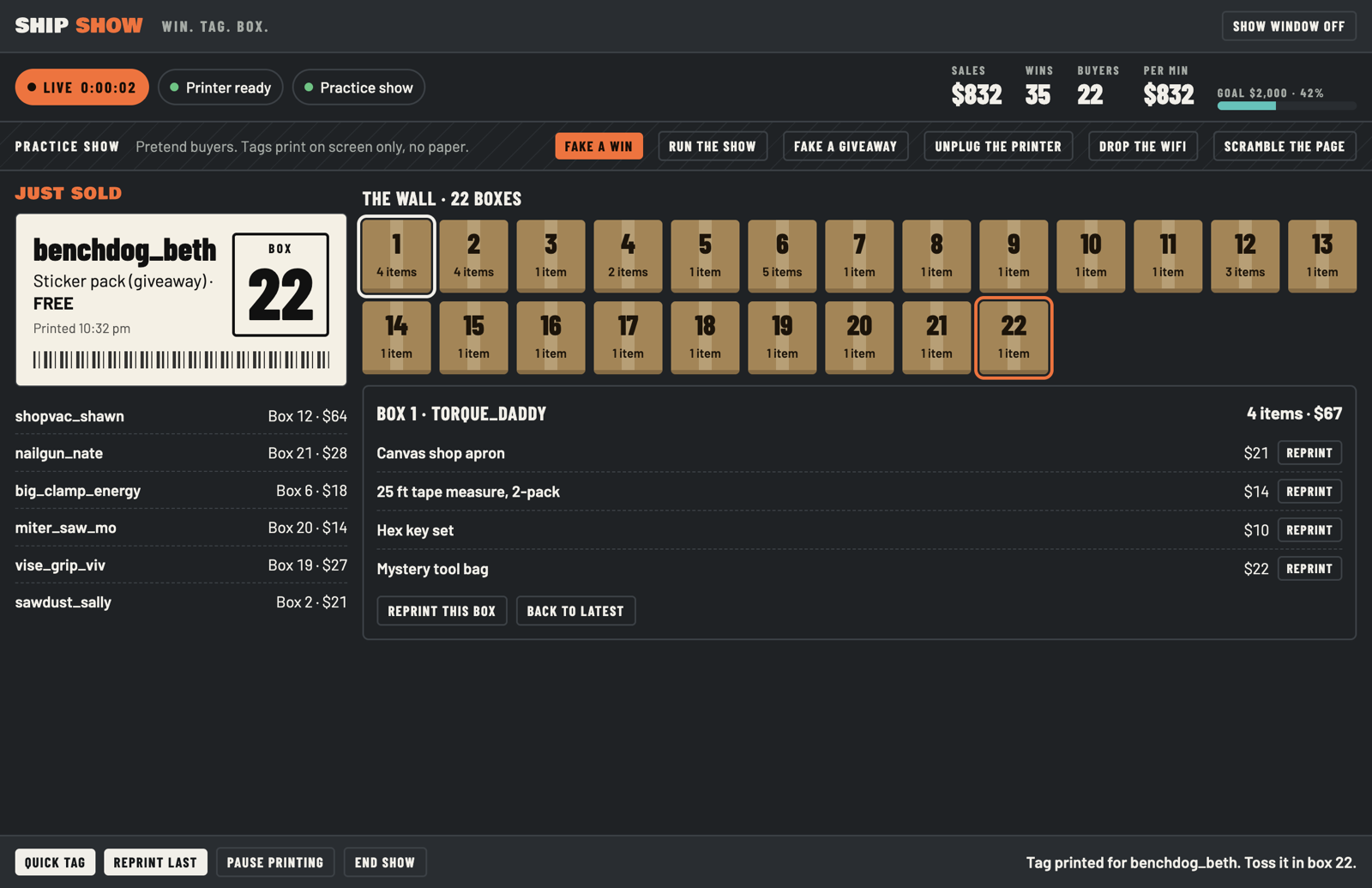
A look around the real app
Six screens from a practice show with pretend buyers. Swipe or scroll sideways.
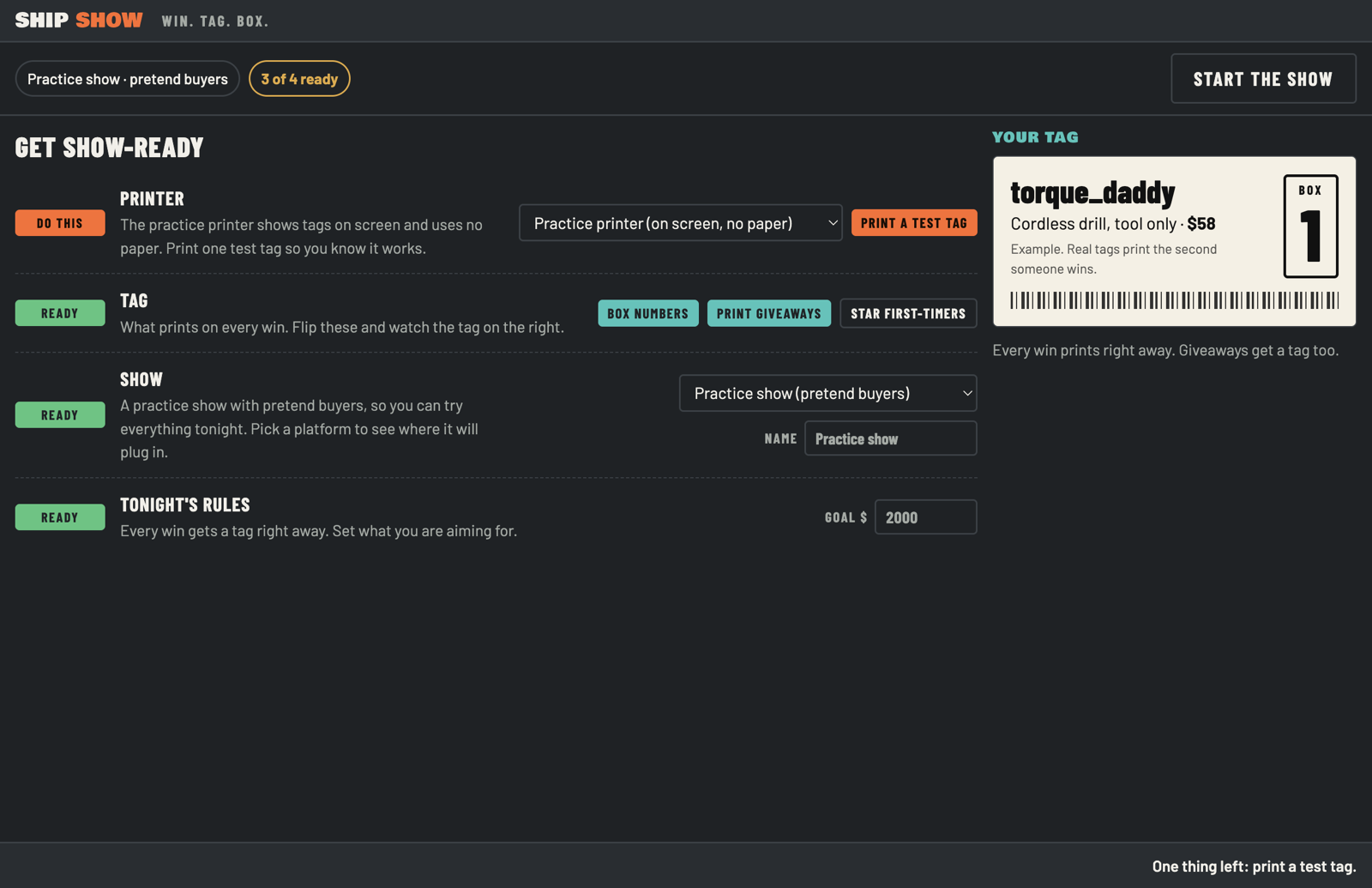
Get show-ready: pick the platform and printer. Practice show, pretend buyers. The Live screen and its wall of boxes. Practice show, pretend buyers. 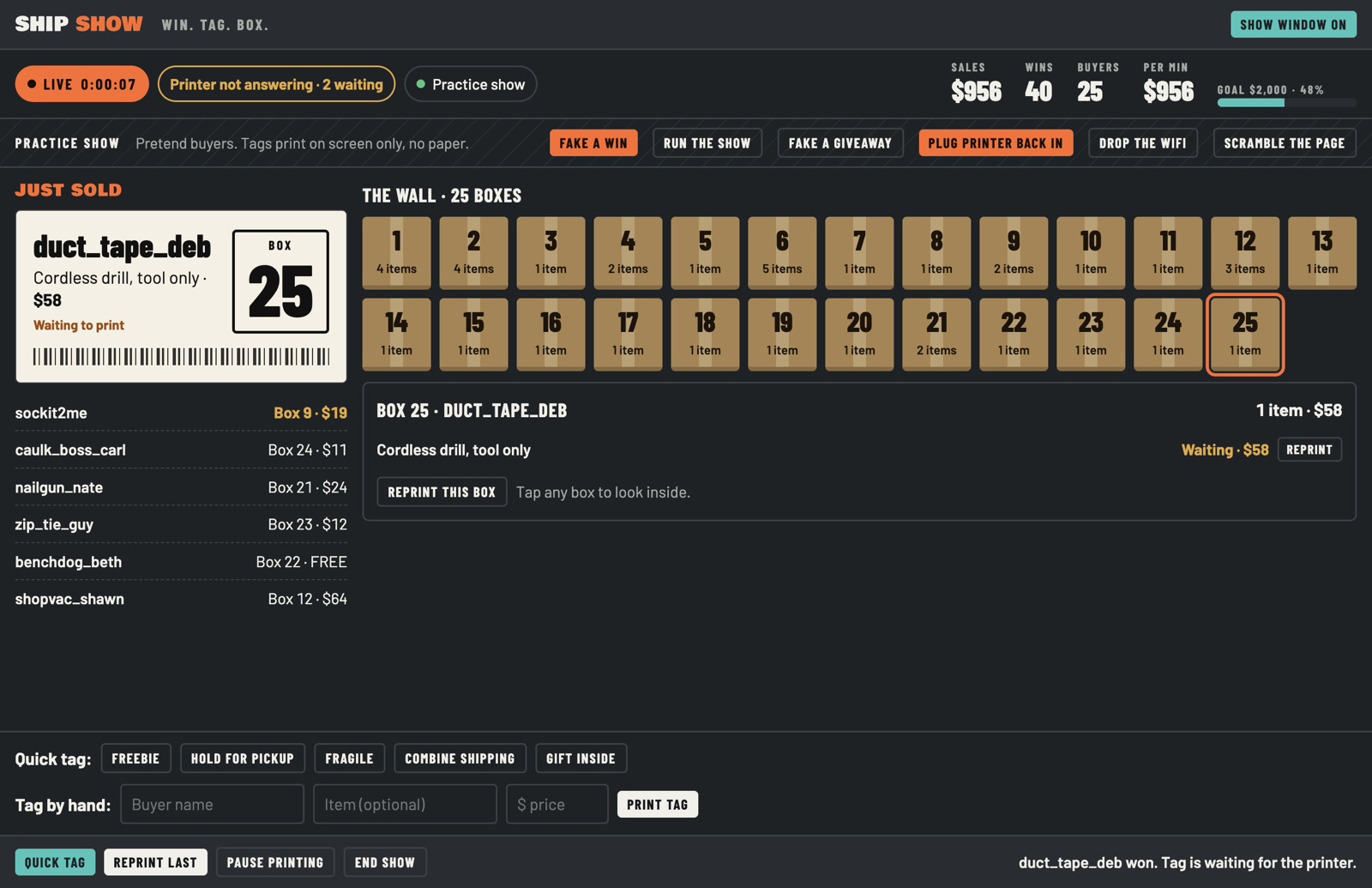
Printer unplugged: the waiting line. Practice show, pretend buyers. 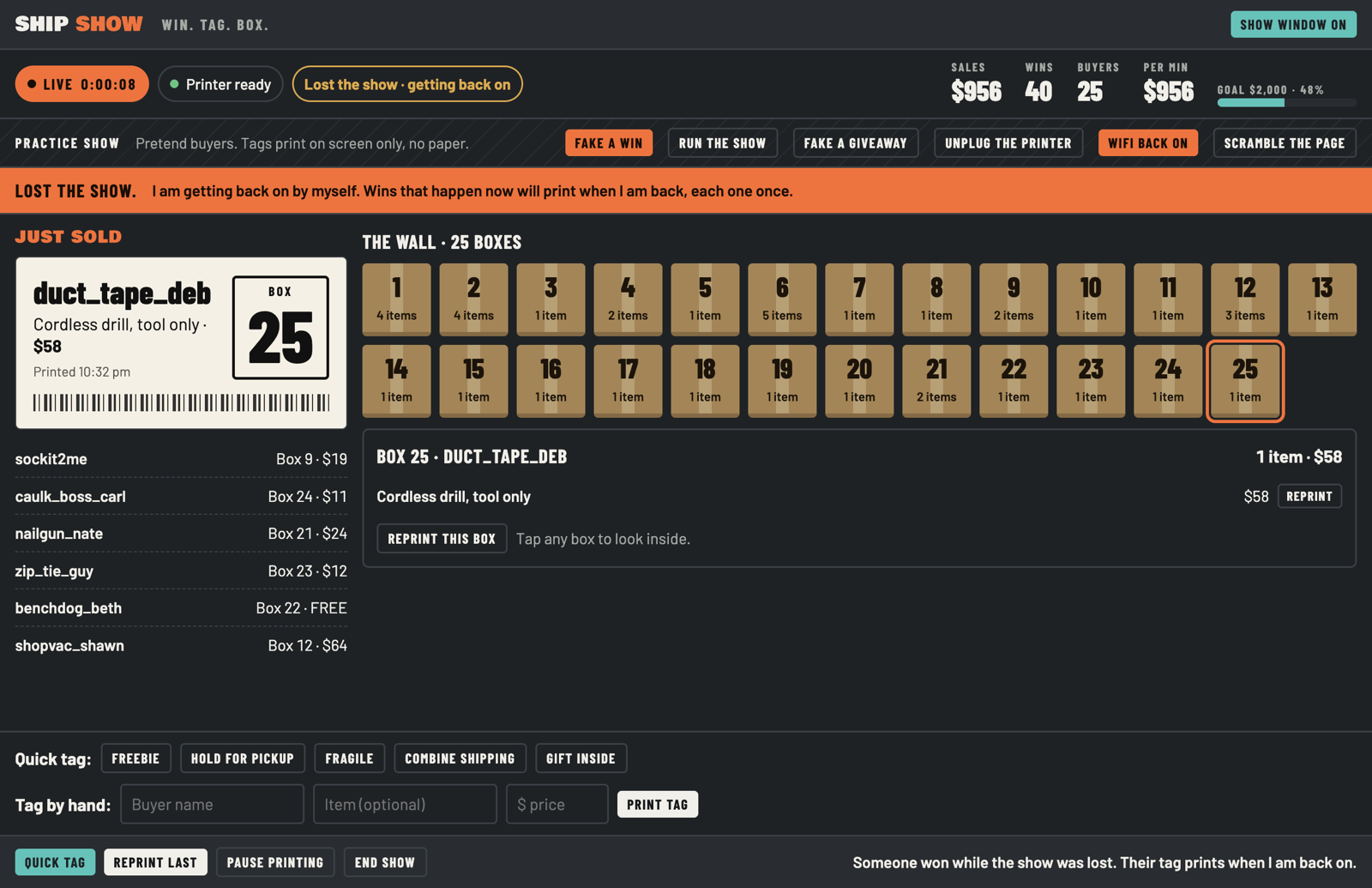
Lost the show: it keeps trying and catches up. Practice show, pretend buyers. 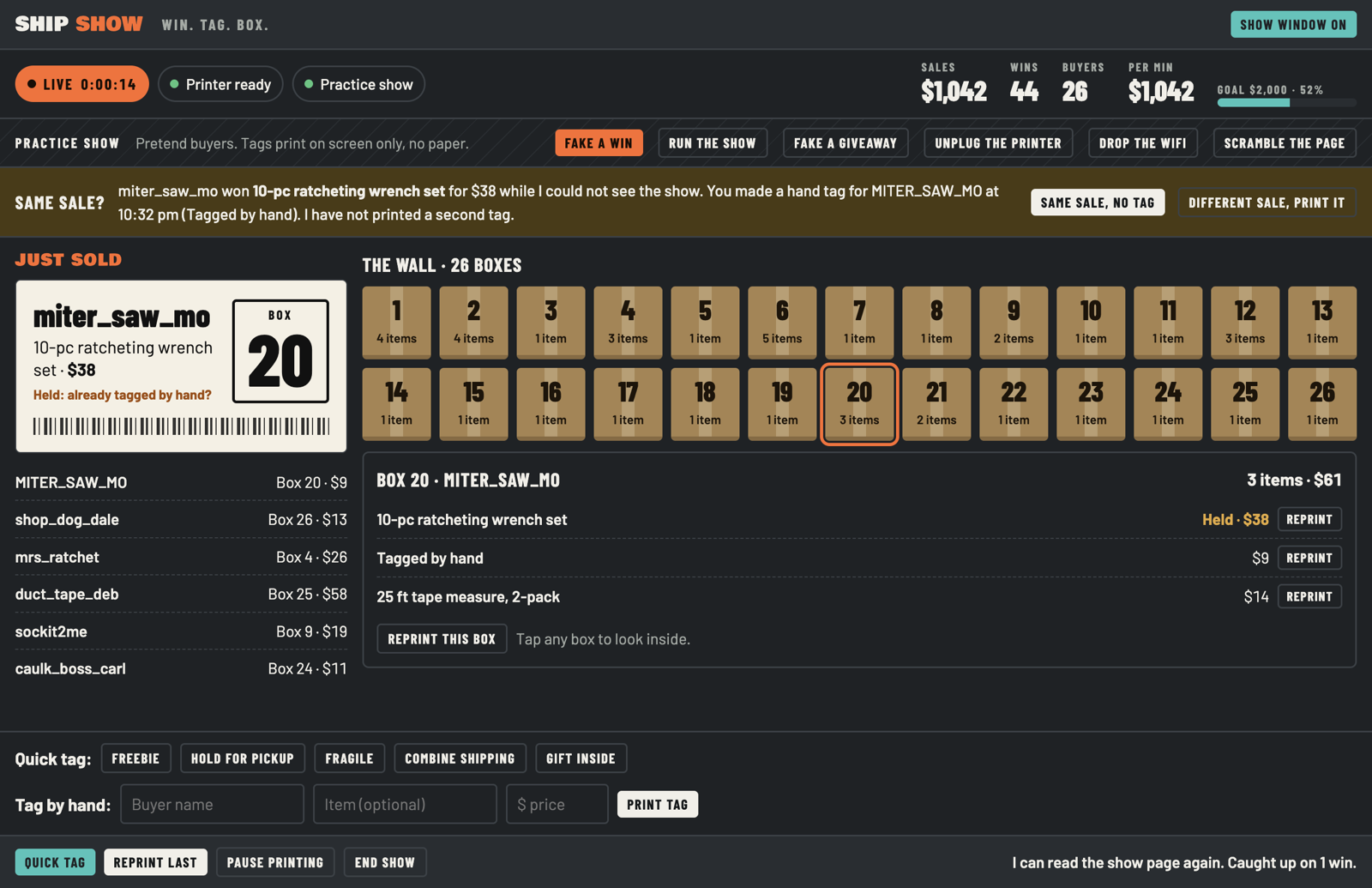
The Same sale question. Practice show, pretend buyers. 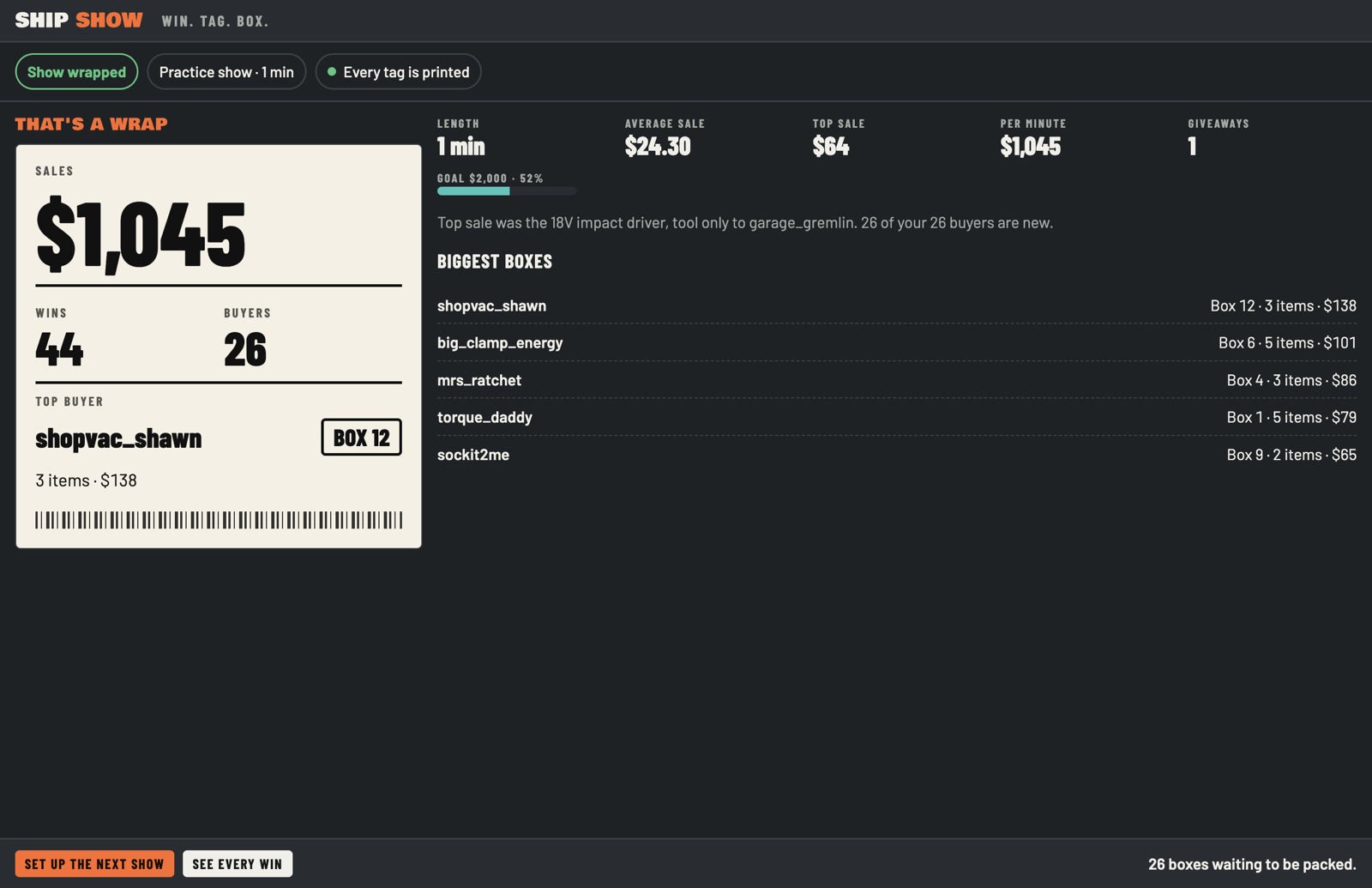
Show wrapped after the night. Practice show, pretend buyers.
Rather press the buttons yourself? Run a practice show in your browser. Want the story behind each screen? Every feature.
The whole toolbox, by job
Tags are the start. Here is everything else Ship Show does, each with its own page. Everything below is built and has been tried on a practice show with pretend buyers; the pages say what has not met the real world yet.
Win and tag
A tag on every win, one box per buyer, show rules and a tag designer with your own logo and four label sizes.
Pack
Pack check after the show, pull-it-back alerts, box full, and a phone view for the packing table.
Know your numbers
Sales history, profit recap, buyer history, and a searchable Show Tape and People cards.
Your gear
Buttons and a Stream Deck add-on: a pedal, a clicker or a key does the reprint, pause or box-full for you.
Safety
The safety net: stay awake, a battery alarm, a backup copy, a spare printer, and pick a show up from a backup.
Platforms
Whatnot works today. eBay Live, TikTok Shop LIVE and Palmstreet are built, not tried on a real show. Where each one stands.
Just built, and what is planned
Just built, and not yet tried on the real Whatnot or on real paper: a Show picker (pick tonight's Whatnot show), a Stock room (see your Whatnot products and what is left, print shelf labels and count your shelves, and send fixed counts to Whatnot after showing you the changes and asking first) and a drag-and-drop tag layout. Planned, with no dates: Windows, shipping labels and packing slips, a chat desk and a giveaway runner. See the roadmap, or ask for the thing you are missing.
Try it now
Run a practice show in your browser, with pretend buyers and a printer that prints on screen. Or help test the real thing.
Built for every stage you sell on
Four platforms, one app, one wall of boxes. We are building them one at a time and telling you the truth about which ones work.
Whatnot
Working
On Whatnot's official seller connection. Checked against real orders; first real live show coming up.
eBay Live
Built, not tried on a real show
Proven on a practice bench. Needs your own eBay developer keys.
TikTok Shop LIVE
Built, not tried on a real show
Proven on a practice bench. Needs your own TikTok Shop developer keys.
Palmstreet
Built, not tried on a real show
Proven on a practice bench. Needs your Palmstreet ShipStation feed sign-in.
Made by a seller, not a committee
Ship Show is built by a live seller who runs late-night tool auctions and wanted the tool he would actually trust on his own show.
Every feature starts with a real thing that goes wrong on a live show. That is also the roadmap: sell, get annoyed, fix it, repeat.
Where things stand, honestly
The app runs today on a Mac: the wall, the tags, the floating window, the unplugged-printer line, the catch-up after a drop.
Whatnot is connected and checked against real orders. The readers for three more platforms are built, not yet tried on a real show. Windows is planned.
Also built, tried on pretend shows only: Pack check, a safety net, sales history, a searchable Show Tape, People cards, a tag designer, a phone view for the packing table, and buttons for a pedal, clicker or Stream Deck. See every feature.
No fake reviews here. We don't have reviews yet. We have a list, a public tested and not tested page, and a roadmap.
Get your ship together
Ship Show is in early access. Leave your email and tell us where you sell. You confirm it with one tap, then you get one email when your platform is ready. That's the deal.
Planned launch prices: a free plan for one platform, Solo at $24 a month, and all four platforms for $34 a month. Nothing is on sale yet. See pricing.
Early-access price: join before launch and the launch price is yours to keep. The first 10 to confirm their email are founding sellers and hear everything first. How that works.
From the shipping room
Field notes on live selling, packing faster, and surviving your own show.
What we are building next: three things
Three things we said were next: pick tonight's Whatnot show, see your stock, drag the pieces of your tag. Now built, not yet tried on the real Whatnot.
A foot pedal or Stream Deck for your live show
Reprint the last tag, pause printing or mark a box full without the mouse. How buttons and Stream Deck keys work, and what is not proven yet.
Put the box wall on your phone with Phone view
Walk to the shelf with the whole box wall in your pocket. How phone view works on your own Wi-Fi, and what no real phone has tried yet.